
- Company
-
Products
Products
New ProductCloud Server
Fully managed virtual server infrastructure. Setup in minutes, hourly billing and expert support so you can focus on your business.
Try Now -
Solutions
Backup & Security
Data SecurityRansomware & encryptionSilent Ransom: TDEProtection against TDE abuseCloud BackupSecure backup to data centersImage BackupFull disk image + fast recoveryOff-Site BackupOff-site disaster recoveryMobile BackupiOS & Android photos/contactsRansomware ProtectionAgainst ransomware attacksTwo-Factor Auth2FA account security - Plans
- Resources
- Partners
- Blog
Silent Ransom: TDE Abuse Attack and How It Poisons Your Backups?
Silent Ransom:
TDE Abuse Attack and How It Poisons Your Backups?
Narbulut Backup Now · Threat Research Note
You Have a Backup, But You Cannot Open It: A New Generation Ransom Scenario
Classic ransomware is now familiar to most of us: the attacker encrypts your files, drops a ransom note on the screen, and demands cryptocurrency. In this scenario, if you have a backup solution, you usually have a chance to recover without paying the ransom. But what if your backups have already been poisoned by the attacker in advance?
An attack type observed in recent years and becoming increasingly widespread sets up exactly this devastating scenario. The attacker does not encrypt the files on your disk — instead, they activate your database server’s own legitimate encryption features with a key under their own control. Your backup solution keeps reporting “backup completed successfully” for months. Until the attacker emerges and demands the key.
In this article, we will examine this attack known as TDE Abuse, how it operates across all major SQL engines, why it is more dangerous than classic ransomware, and the proactive detection approach Narbulut Backup Now has developed against this threat. We also share a SQL query that system administrators can use to perform manual checks in their own environments.
What Is TDE, and Why Is It Turning Into an Attack Tool?
Transparent Data Encryption (TDE) is a security feature found in many enterprise database engines, primarily Microsoft SQL Server, Oracle Database, MySQL/MariaDB, and IBM Db2. Its purpose is to keep data encrypted “at rest”, that is, on disk; so that even if the database files (.mdf, .ndf, .ldf, tablespace files, etc.) are physically stolen, their contents cannot be read.
When TDE operates, it relies on the following chain:
- Service Master Key (at the server level, at the top)
- Database Master Key (at the database level)
- Certificate or Asymmetric Key (protected by the master key)
- Database Encryption Key (DEK) — the symmetric key that actually encrypts the data; protected by the certificate
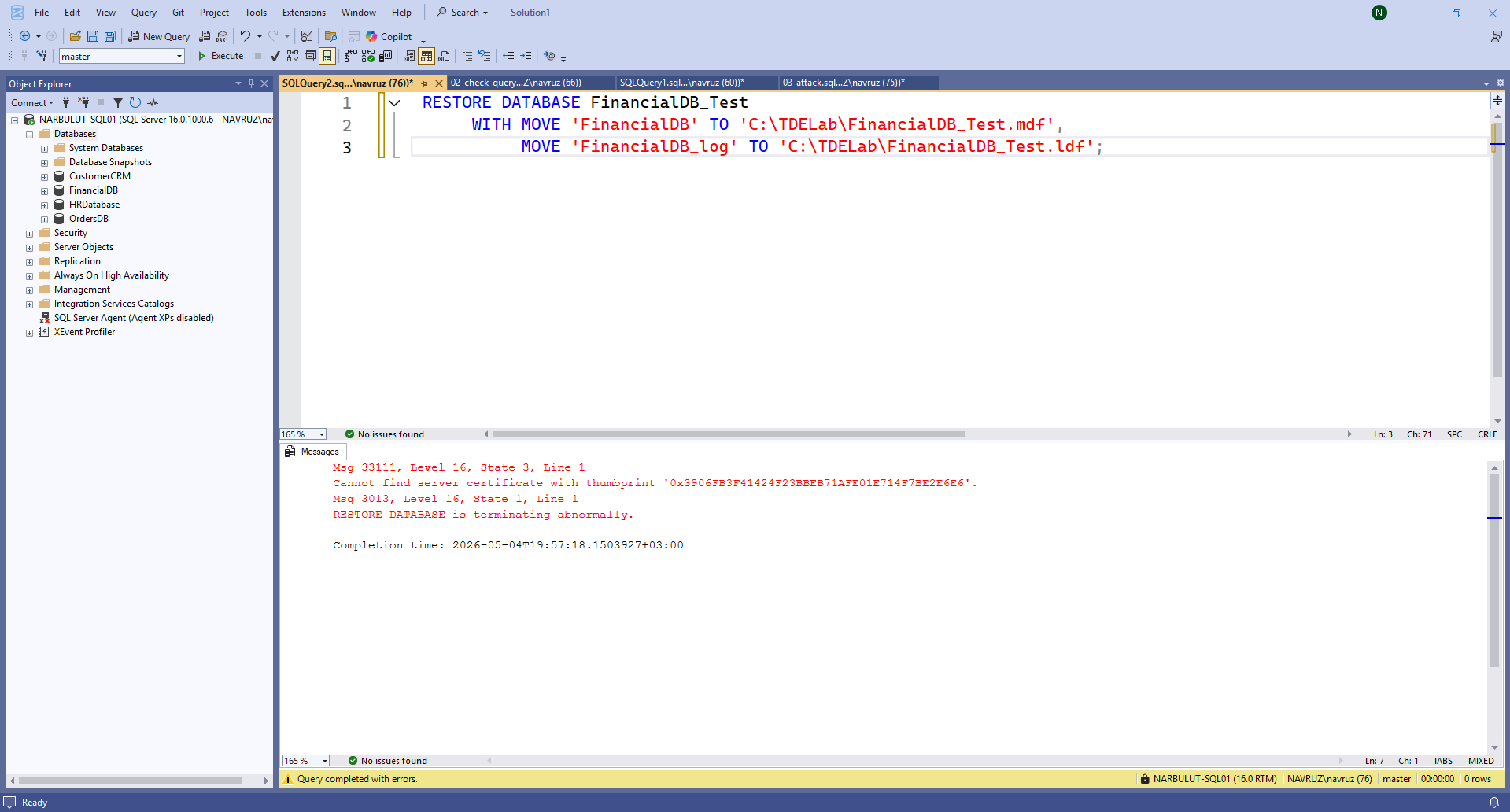
Under normal conditions, this is a hierarchy that the DBA must know and back up regularly. When you want to restore a database to another server, if TDE is enabled, the same certificate must be installed on the target server. If the certificate is missing, the restore operation fails with the following error:
Cannot find server certificate with thumbprint ‘0xABC123…’
The core logic of the attack is built on top of this very error.
Anatomy of the Attack: Step-by-Step Silent Destruction
1. Initial Access
The attacker gains access to the SQL server with sysadmin (or equivalent) privileges. Common vectors:
- Database ports exposed to the internet (1433, 1521, 3306, 5432). Hundreds of thousands of open SQL servers can be found on Shodan.
- Weak or default passwords (sa, root, system/manager).
- Command execution via SQL Injection (xp_cmdshell, COPY FROM PROGRAM, etc.).
- DBA accounts stolen through phishing or credential dumps.
- Lateral movement via linked server / dblink.
2. Reconnaissance
The attacker does not act immediately. First, they map out:
- The current backup strategy (msdb.dbo.backupset, RMAN catalog).
- Backup retention period — how many days of historical backups are kept?
- Replication and DR topology.
- Identification of critical databases.
This information determines the “maturation time” of the attack.
3. Activation of Encryption
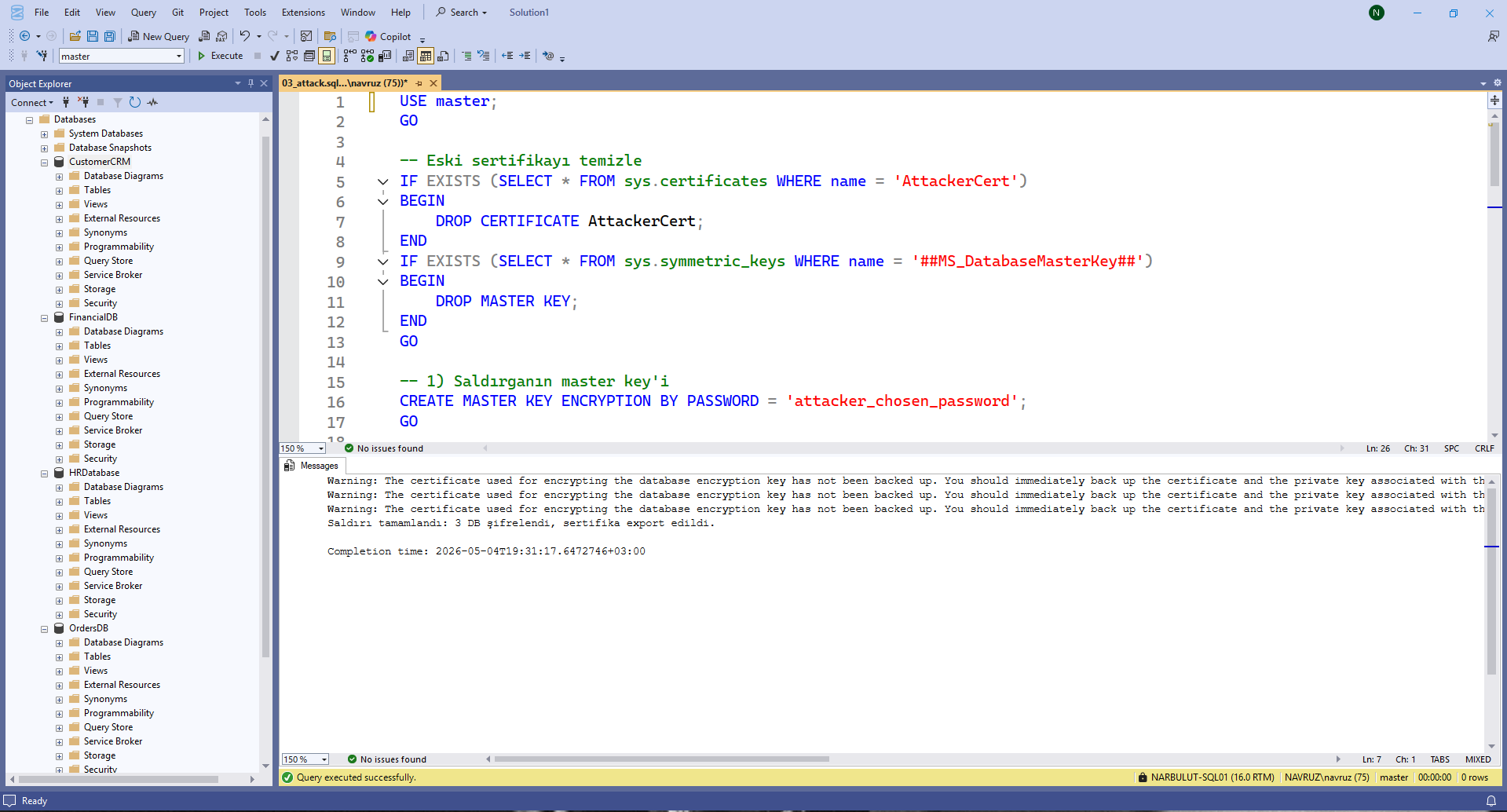
The attacker generates a certificate under their own control and encrypts the databases with this certificate. MSSQL example:
-- Attacker's own master key
CREATE MASTER KEY ENCRYPTION BY PASSWORD = 'attacker_chosen_password';

-- Attacker's own certificate
CREATE CERTIFICATE AttackerCert WITH SUBJECT = 'Legit Looking Cert';

-- Create Database Encryption Key
USE [VictimDB];
CREATE DATABASE ENCRYPTION KEY
WITH ALGORITHM = AES_256
ENCRYPTION BY SERVER CERTIFICATE AttackerCert;

-- Enable TDE
ALTER DATABASE [VictimDB] SET ENCRYPTION ON;
The same logic is applied via Wallet and ALTER TABLESPACE … ENCRYPTION ONLINE in Oracle, via keyring and ALTER TABLE … ENCRYPTION=’Y’ in MySQL, and via keystore in Db2.
4. Stealing and Destroying the Key
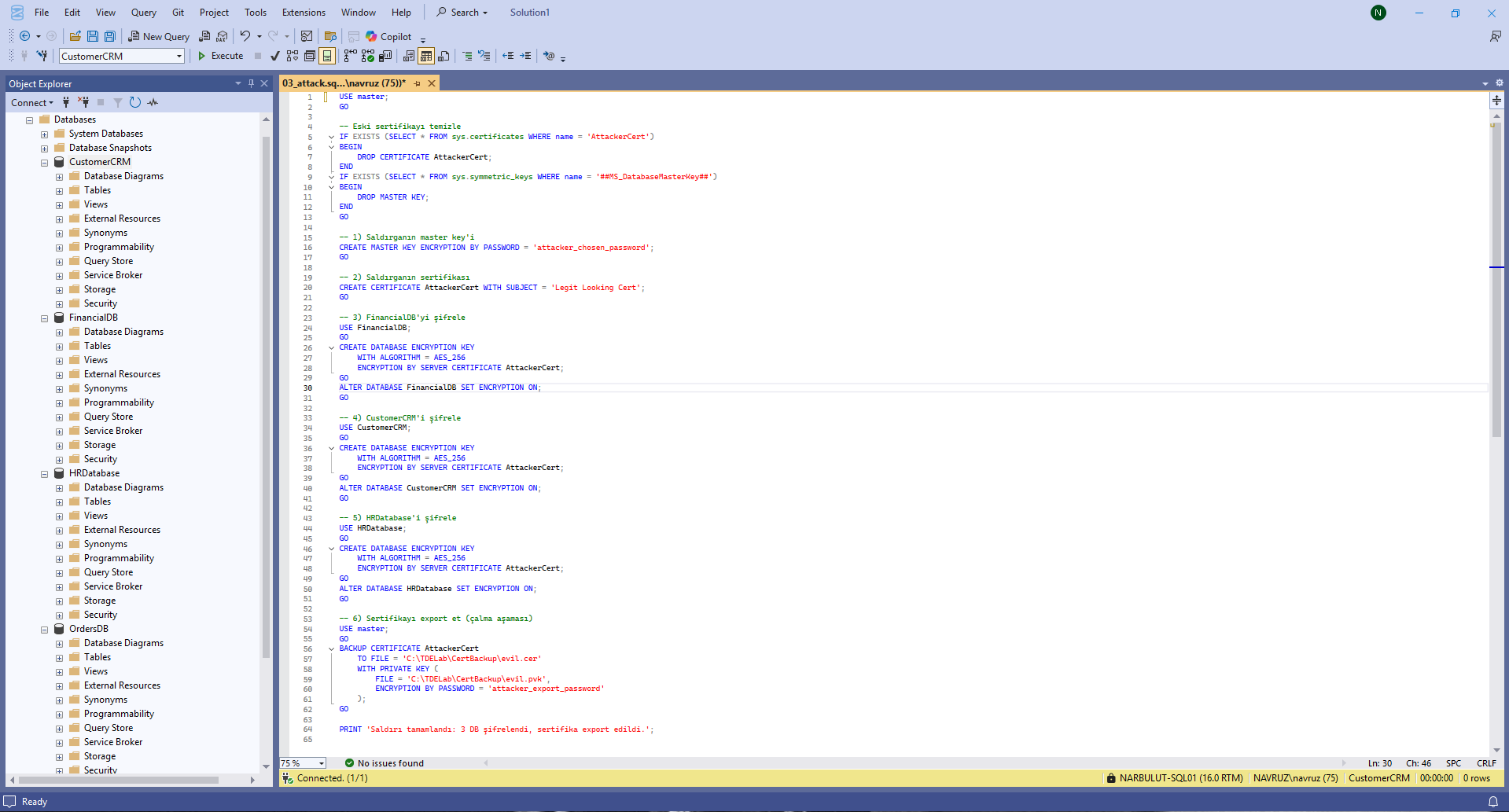
The attacker exports the certificate (.cer) and the private key (.pvk) to their own system, then deletes them from the server. They can also change the master key password. After this point, the databases keep running — because SQL Server continues to use the DEK it holds in memory — but when the server is restarted or a restore is attempted, the key is no longer accessible.

5. “Cold Preparation” — The Sneakiest Part of the Attack
This step is what makes the attack much more devastating than classic ransomware. A smart attacker does not demand the ransom right away. After enabling encryption, they wait 30, 60, even 90 days. During this period:
- All full backups already back up data encrypted with the attacker’s key.
- Differential and transaction log backups are poisoned in the same way.
- Poisoned data is carried over to replication targets (Always On AG, Data Guard, etc.) and DR sites as they are kept in sync.
- Older “clean” backups get deleted as their retention period expires.
The result: by day 90, when the attacker emerges and demands the ransom, the victim does not have a single usable backup left.
6. Ransom Demand
The attacker drops the database, restarts the server, or simply leaves a ransom note. When the victim tries to restore from backup, they encounter that famous error:
The certificate is in the attacker’s hands. If the payment is not made, accessing the data is mathematically impossible (AES-256 brute-force is not practical).
The Threat Covers All Major SQL Engines
Every SQL engine with encryption capability can be vulnerable to this class of attack. The attack surface on the major database engines can be summarized as follows:
Uses TDE, Always Encrypted, and Column Encryption as its encryption mechanisms. The attack surface is very wide.
Uses TDE and Oracle Wallet. The engine with the widest attack surface; RMAN backups cannot be used without the wallet.
Uses InnoDB Tablespace Encryption and Binary Log Encryption. The replication chain is also impacted.
Encryption is provided via EDB/Cybertec/Crunchy TDE patches and pgcrypto. More limited in the community edition, but available in enterprise distributions.
Within the MITRE ATT&CK framework, this attack is classified under the T1486 – Data Encrypted for Impact tactic.
Why Can’t Classic Backup Solutions Catch It?
There are concrete reasons why traditional backup and security products fail to detect this attack:
1. Backup integrity ≠ Data readability
SQL Server’s RESTORE VERIFYONLY command, or the verification mechanisms of backup products, perform a checksum check — that is, they answer the question “is this backup corrupted?”. They do not query whether the data is readable. A backup containing encrypted data can perfectly well be marked as “verified”.
2. Block-level transparency
A SQL backup is fundamentally a block-level copy of the data files. If the data file is encrypted, the backup is also taken in its encrypted state. The backup software does not see this difference.
3. EDR/AV invisibility
The commands used during the attack — CREATE CERTIFICATE, ALTER DATABASE SET ENCRYPTION ON — are legitimate SQL DDL commands. They carry no malicious software signatures. No random write pattern is generated on disk; this also renders classic ransomware detection methods ineffective.
4. DLP blindness
The certificate and private key files exfiltrated by the attacker are kilobytes in size. Most DLP solutions do not raise alarms for transfers this small.
Narbulut Backup Now’s Approach: Check Before You Back Up
Narbulut Backup Now operates on the principle of proactive detection against this class of attack. Before the backup process begins, it queries the encryption state of the databases on the target SQL Server and warns the user if an anomalous condition is detected.
What this approach means: If an attacker has infiltrated your environment and placed your databases under TDE with their own certificate, Narbulut Backup Now notices this situation in the very first backup attempt. The backup is still taken, but a warning is sent to the system administrator: “This database is in an encrypted state — is this a configuration expected on your side?”
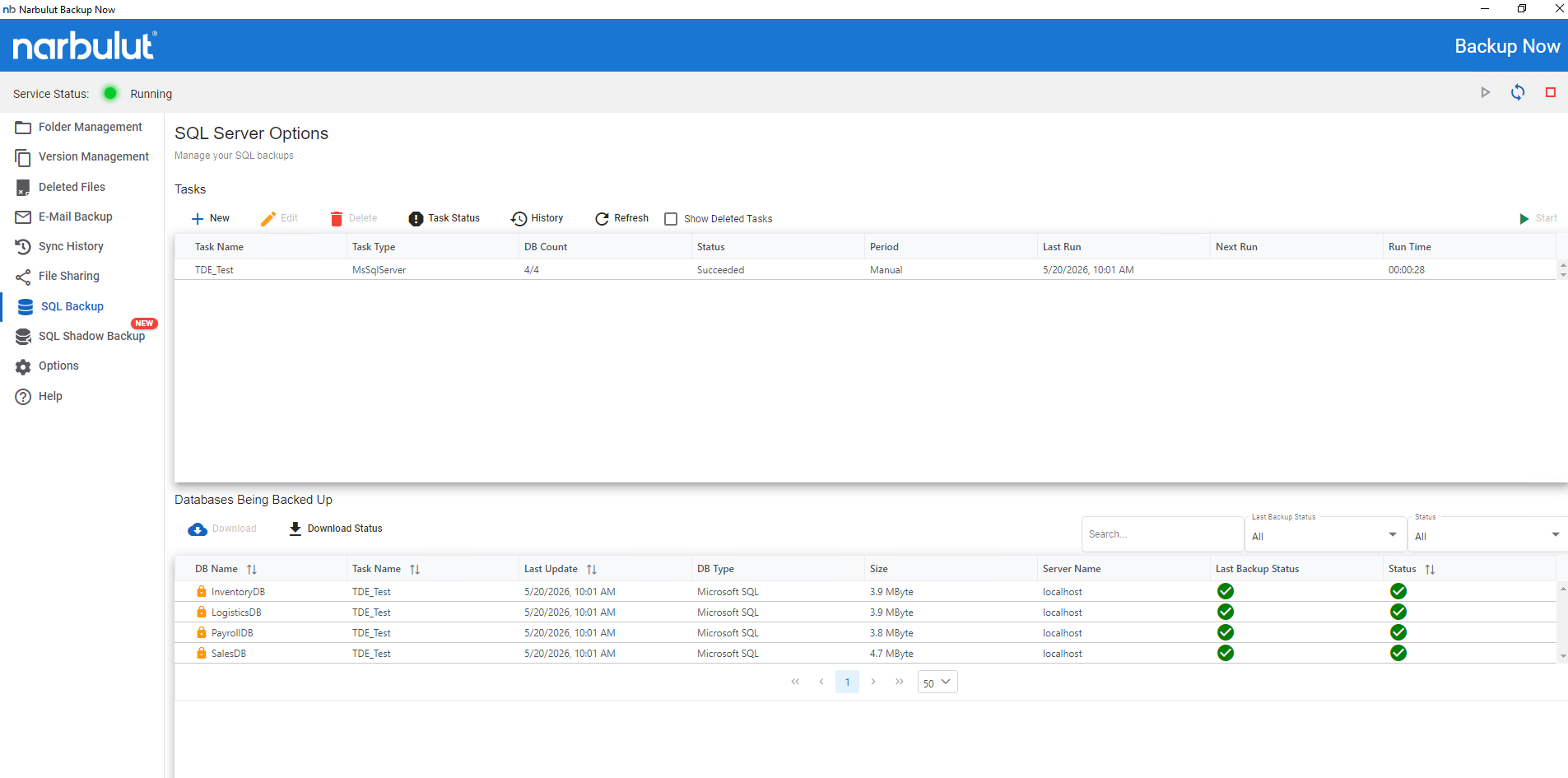
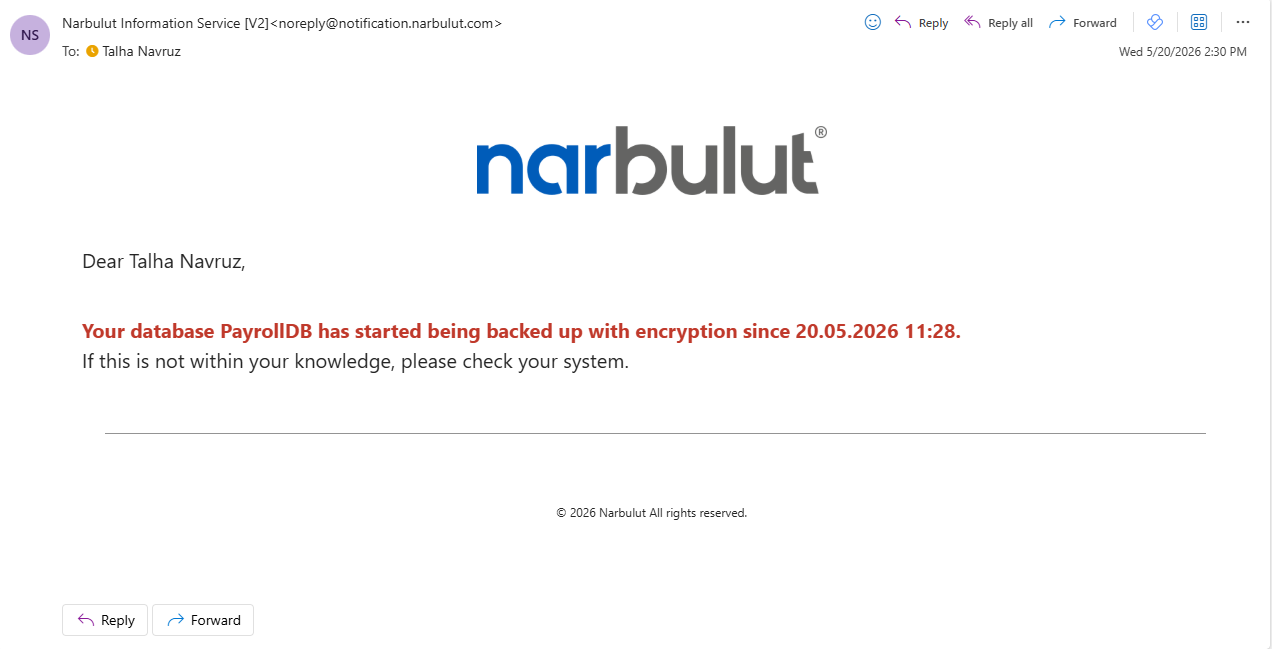
This simple but critical check breaks the cold preparation phase of the attack. It becomes impossible for the attacker to silently poison backups for 90 days. Because the moment TDE is enabled, an alarm is raised in the very first backup cycle.
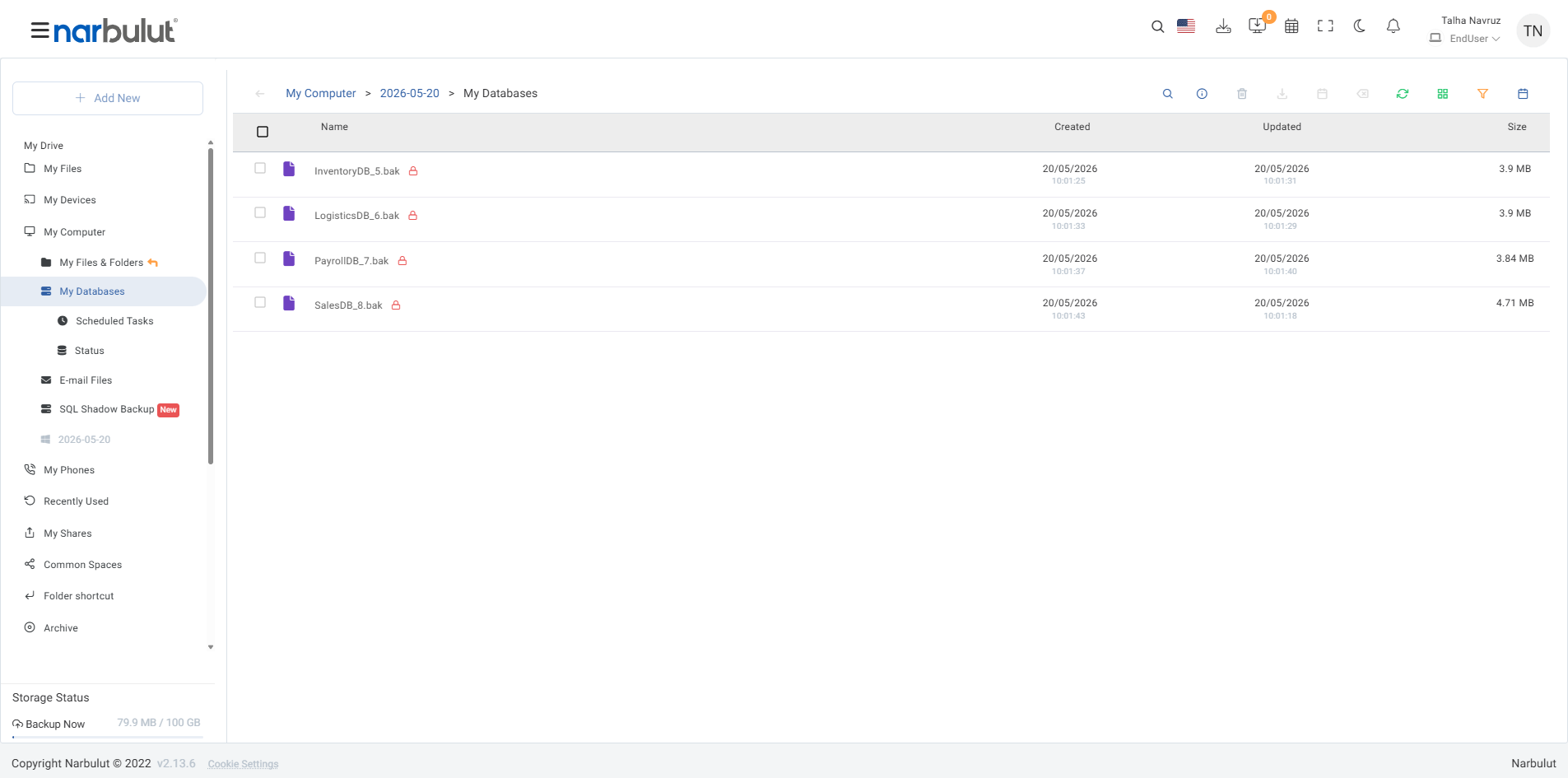
The pre-backup TDE status check provides an additional layer of defense for our enterprise customers against attack scenarios that slip past classic backup solutions.
Manually Querying the Encryption State in SQL Server
Even though Narbulut Backup Now performs this check automatically, the SQL query below can be used by system administrators to perform an on-the-spot verification in their own environments. You can run this query via SSMS or sqlcmd with a sysadmin-privileged account:
SELECT
  db.name AS [Database Name],
  db.is_encrypted AS [TDE Flagged? (1=Yes)],
  CASE dek.encryption_state
    WHEN 0 THEN 'No Key / No Encryption'
    WHEN 1 THEN 'Unencrypted'
    WHEN 2 THEN 'Encryption In Progress'
    WHEN 3 THEN 'Encrypted (Active)'
    WHEN 4 THEN 'Key Change In Progress'
    WHEN 5 THEN 'Decryption In Progress'
    WHEN 6 THEN 'Protection Change In Progress'
    ELSE 'Unknown'
  END AS [Detailed State],
  dek.percent_complete AS [Operation Completion Percentage]
FROM sys.databases db
LEFT JOIN sys.dm_database_encryption_keys dek
  ON db.database_id = dek.database_id;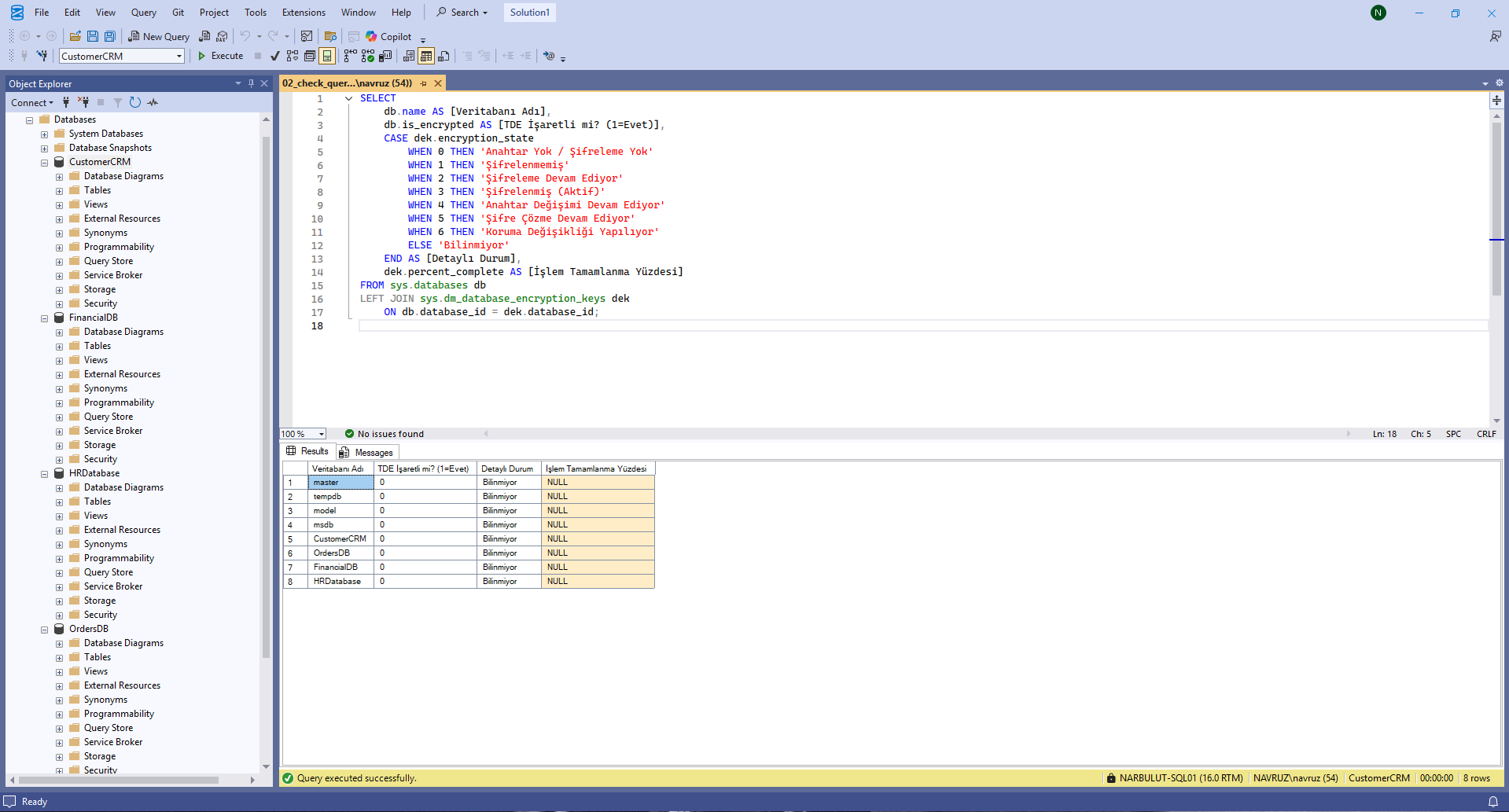
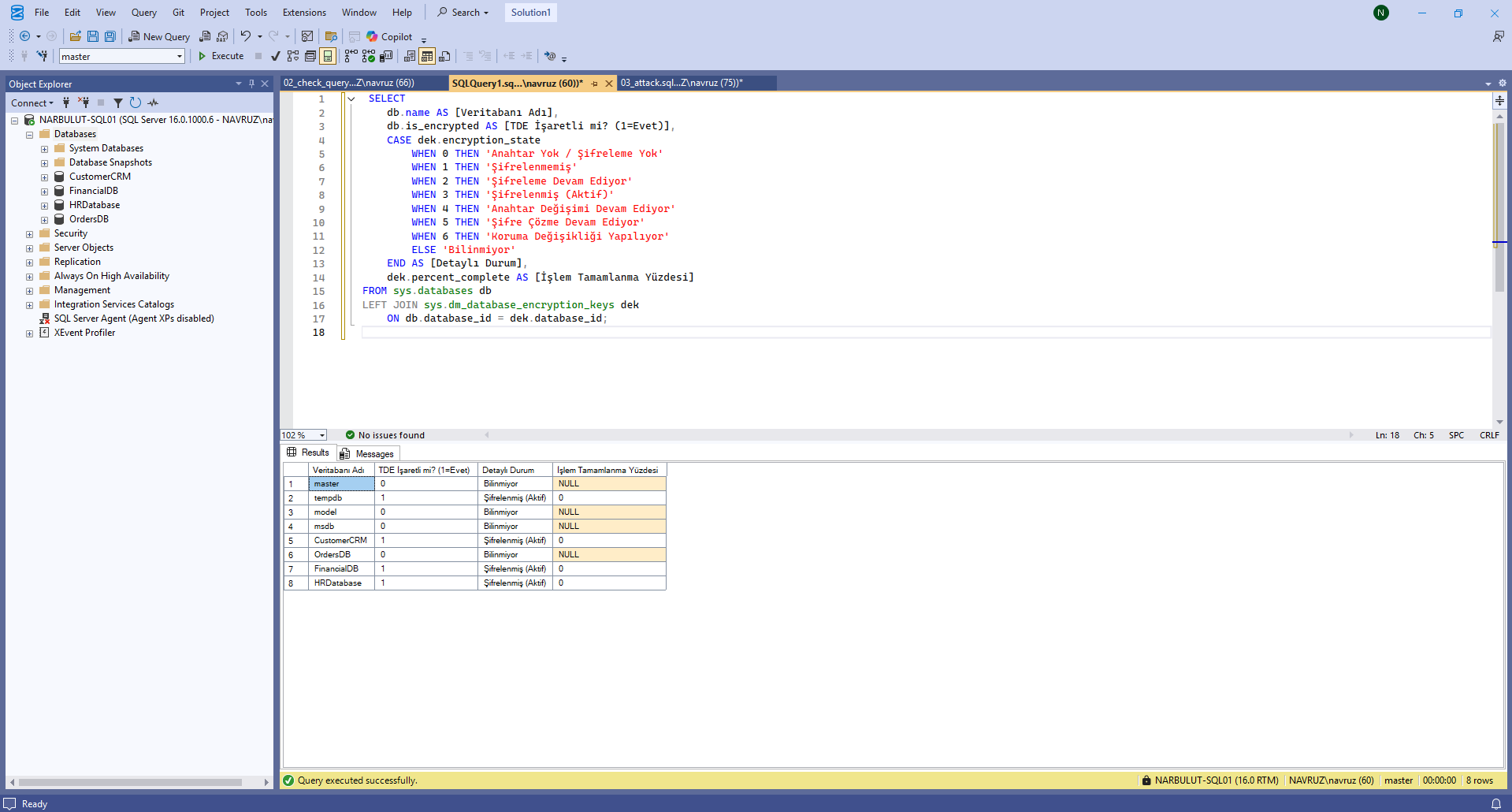
How Should the Query Output Be Interpreted?
- is_encrypted = 0 and encryption_state = NULL → TDE is not enabled on the database. The expected normal state (if you have not planned for TDE).
- is_encrypted = 1 and encryption_state = 3 → The database is actively encrypted. Is this a configuration you have intentionally put in place? If your answer is no, investigate urgently.
- encryption_state = 2 → Encryption is currently in progress. If you did not initiate such an operation, the attack is most likely happening right now. Isolate the server immediately.
- encryption_state = 4 or 6 → A key or protection change is in progress. Again, outside of intentional maintenance, this state is suspicious.
What Should You Do If You Detect an Anomaly?
- Isolate the server immediately — cut the network connection, but do not stop the service (so you do not lose the DEK held in memory).
- Engage a forensic team for DEK extraction from memory — in some cases the DEK may still be in memory.
- Back up the certificate together with the master key (if you still have access):
BACKUP MASTER KEY TO FILE = 'C:\Backup\master_key.snk'
ENCRYPTION BY PASSWORD = 'StrongPassword123!';

BACKUP CERTIFICATE [CertificateName]
TO FILE = 'C:\Backup\cert.cer'
WITH PRIVATE KEY (
  FILE = 'C:\Backup\cert.pvk',
  ENCRYPTION BY PASSWORD = 'StrongPassword123!'
);- Examine your oldest backups — if there is a point in time where TDE was not yet enabled, you may have a chance at point-in-time recovery.
- Preserve the audit logs — reconstruct the timeline of the attack via sys.fn_get_audit_file(), Extended Events, and the Windows Security Log.
- Notify the relevant authorities — a data breach notification may be required under applicable data protection regulations.
Recommended Best Practices for Protection
A layered approach is required to protect against this class of attack.
Centralize key management
If you use TDE, do not keep the certificate and master keys on the local server; instead, store them in an HSM (Hardware Security Module) or in enterprise Key Management solutions (Thales CipherTrust, Azure Key Vault, AWS KMS). In that case, even if the attacker is a sysadmin, they cannot generate or export new keys.
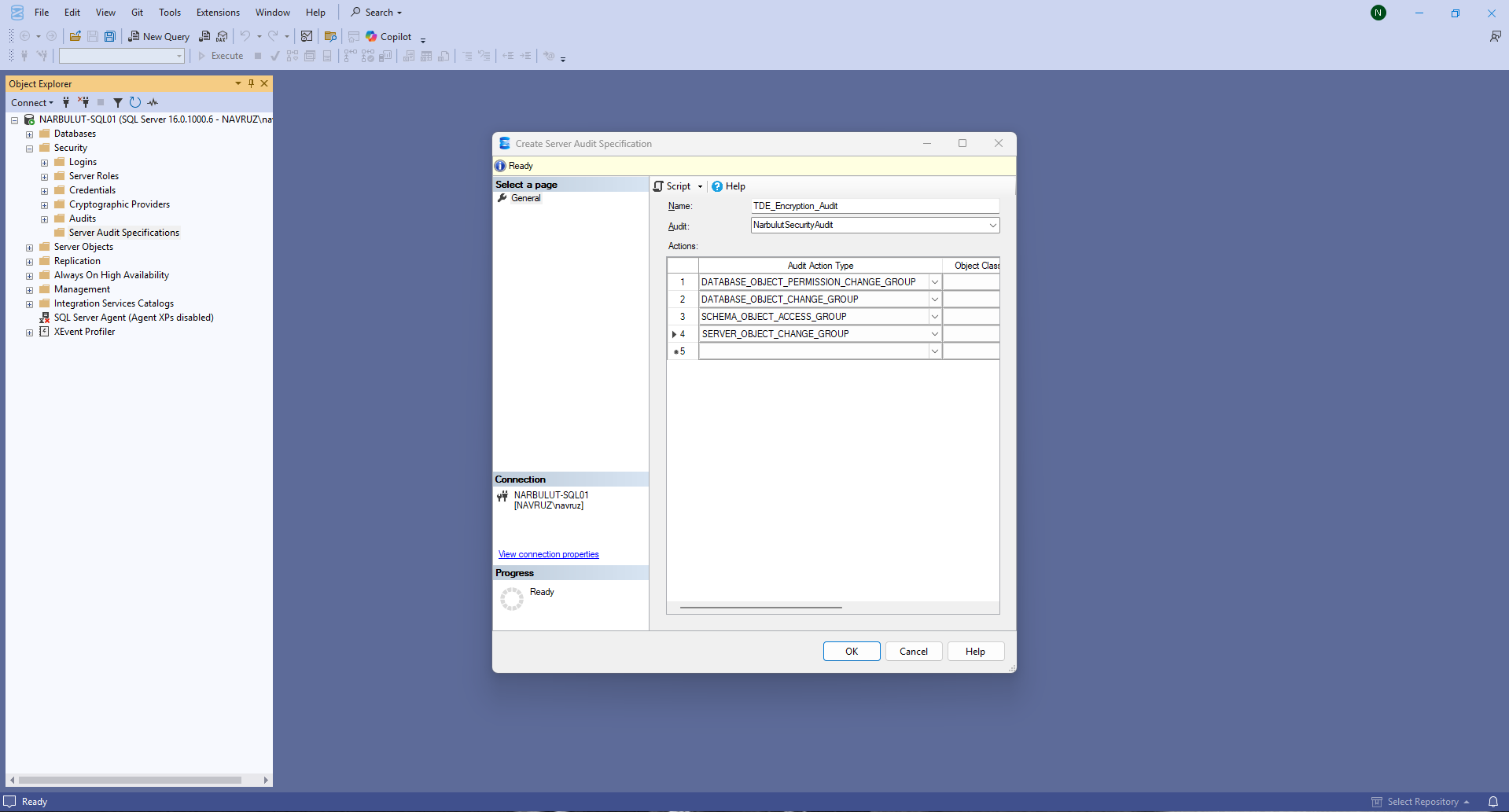
Set up audit + alarms for encryption activation
Monitor CREATE CERTIFICATE, CREATE DATABASE ENCRYPTION KEY, and ALTER DATABASE … SET ENCRYPTION ON commands via SQL Server Audit or Extended Events. Under normal circumstances, these commands run only a few times a year; every time one runs, an alarm should be raised to your SOC team.
Run restore drills
On a quarterly basis, perform a full restore to an isolated environment and verify that business-critical tables actually contain readable data. Relying on the “restore successful” message alone is not enough.
Privileged access management
SQL sysadmin privileges should not be held by day-to-day operational accounts. Use just-in-time access (CyberArk, Azure PIM) and MFA-protected bastion hosts.
Use your backup solution’s encryption-detection capability
Proactive features such as Narbulut Backup Now’s TDE state check integrate attack detection into the backup process itself. This provides an additional line of defense without the need for a separate monitoring layer.
Conclusion
The TDE Abuse attack is one of those rare threats that shakes the security world’s “if I have a backup, I’m safe” assumption. The attacker does not encrypt your files, does not delete your backups, and may not even raise any alarm in your system. They simply activate your own legitimate encryption tool with their own key and wait patiently.
The most effective defense against this threat is to continuously monitor encryption state and make it a part of the backup process. Narbulut Backup Now’s TDE check, performed before each backup is taken, has been built on exactly this principle. In addition, by using the SQL query we shared above, you can perform on-the-spot verification in your own environment and detect anomalies at an early stage.
A modern backup strategy does not just copy data; it also ensures that the copied data is actually usable. This awareness is the key to being prepared today for tomorrow’s ransom scenarios.
Protect your data against ransomware with Backup Now Pro
Verified, secure backups that withstand stealthy threats like TDE abuse. Try Backup Now Pro now with a free trial license.

