narbulut

Narbulut Mobile App

Back up your mobile devices with a single click. Manage your data from anywhere, create documents and share with your team

OVERVIEW

Back up your contacts, photos and videos!

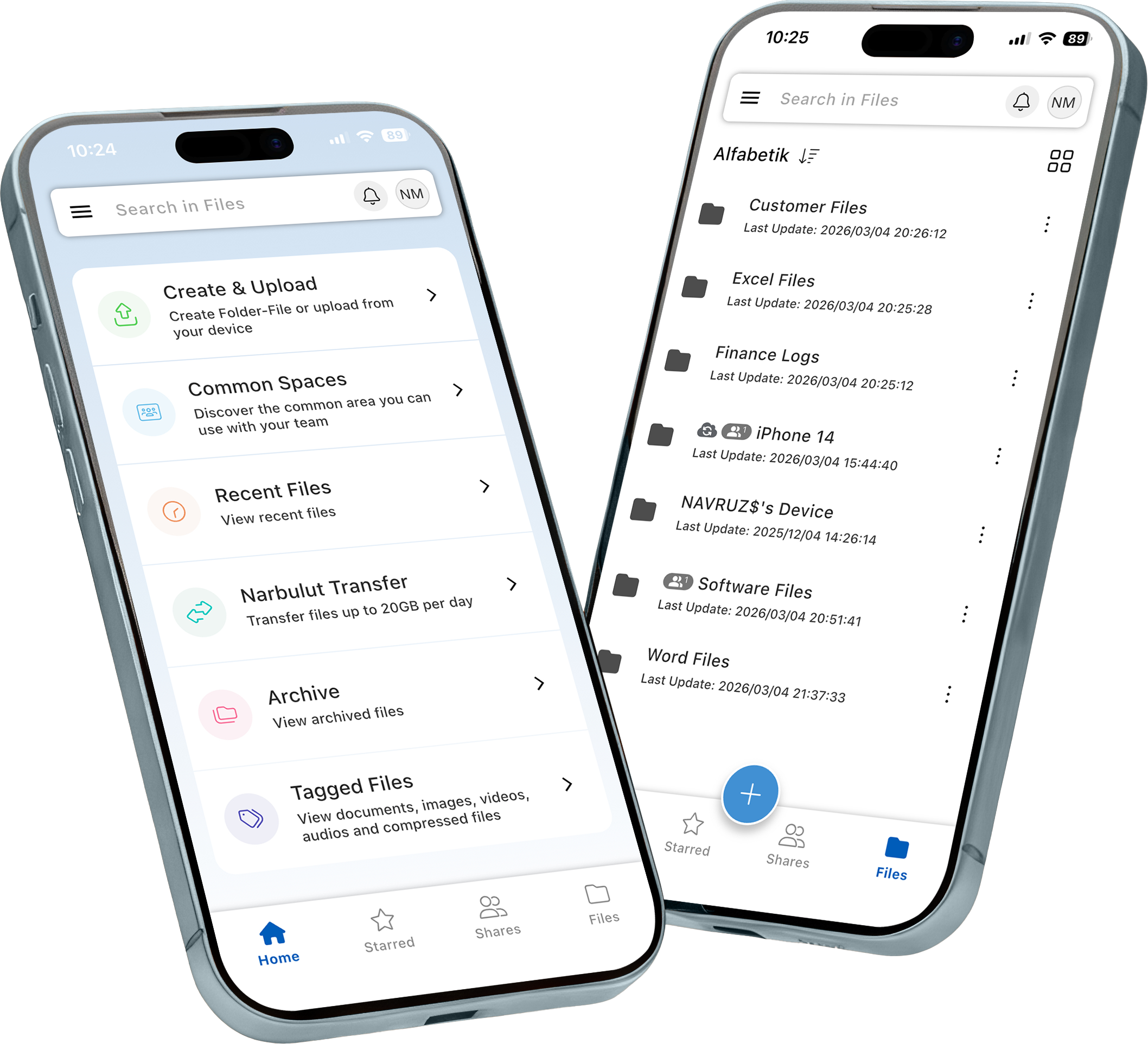
With Narbulut Mobile App, you can back up your contacts, photos and videos. You can store, share your files and folders, and collaborate with your teammates.

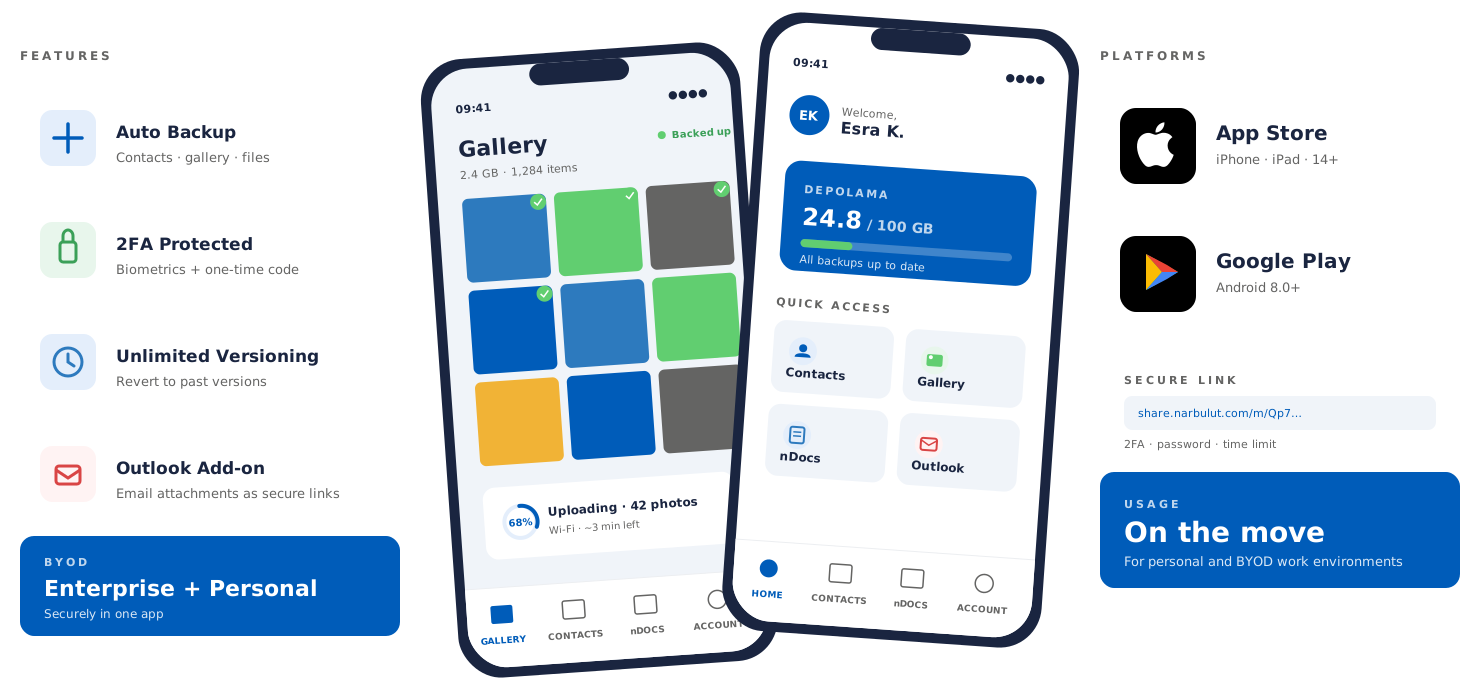
Automatically back up the contacts saved in your phone. View or restore from the cloud whenever you need.

Automatically back up your photo gallery. View or restore from the cloud whenever you need.

Automatically back up your video gallery. View or restore from the cloud whenever you need.

Create documents, spreadsheets, and presentations on all your devices without needing an additional license, using free online office applications. Work from anywhere.

Edit all your created or uploaded documents from anywhere, on all devices. Continue your work right where you left off.

Upload your files and folders from all your devices. Keep your data safely with you at all times.

Scan your written documents as PDF files using the document scanning feature and archive them.

Share secure spaces with business partners who are not Narbulut users. Collaborate in the same folder. Increase your productivity.

Share files and folders with your colleagues with a single click. Work simultaneously on the same document.

Don't struggle to send large files. Create a link for your file or folder and share it. Send your large data in seconds.

Create folders in the shared workspace and authorize your users. Collaborate from anywhere.

Work on the same file with your team at the same time. Instantly see changes made by users.

Create, edit, and share your documents without
needing an office application license.
Collaborate in real-time on documents
with your colleagues.

Create, edit, and share spreadsheets without
needing an office application license.
Collaborate in real-time on spreadsheets
with your colleagues.

Create, edit, and share professional presentations
without needing an office application license.
Collaborate in real-time on presentations
with your colleagues.

Create, edit, and share your documents,
spreadsheets, and presentation files
from anywhere, synchronized across all your devices.
No extra license fees.

All your users can use the folders you create in the Shared Space within their permissions.
You can instantly upgrade to a higher plan when your quota is full.

Personal Space is a user-specific area. You can use 5GB of personal space for free. You can instantly upgrade to a higher plan when your quota is full.

Create unlimited users. Each user gets 5GB of free Personal Space.

Versions are not counted against your quota. All changes to your files are kept as versions. Unlimited versions for the last month, the last version of each month for the previous 10 months, and the last version of the previous year are stored by default. The version size is the same as the file size on your computer.

Even when your quota is full, you can continue working up to 10% over your limit.

Customize notification options from the Narbulut management panel. Track all notifications in real-time.

Customize report options from the Narbulut management panel. Specify which reports should be sent to which email address and how.

Download the Narbulut Mobile App. Track all notifications and reports in real-time. Take immediate action with the mobile app.

Narbulut mobil iş teknolojisi

Collect your memories with Narbulut, share with your loved ones!

Automatically back up your video gallery. View from the cloud with Narbulut Mobile App, share with your loved ones.

DOWNLOAD THE APP

Mobile App for All Your Devices

Ensure your organization's data security using industry-leading products
and solutions. Prevent data loss and grow your business.

Android Operating Systems

Easily install on your Android devices via Google Play Store

iOS Operating Systems

Download on your iPhone and iPad devices via App Store

HarmonyOS Operating Systems

Install on your HarmonyOS devices via Huawei AppGallery

Narbulut mobil bulut yedekleme

Automatically back up and restore your phone contacts!

Transfer your contacts easily and quickly when changing devices. Install Narbulut Mobile App on your new device and restore your contacts backup.

Narbulut mobil bulut yedekleme

How It Works?

01

Download the App

Click to download Narbulut Mobile from App Store, Google Play or Huawei AppGallery

02

Start Backup

Select your photos, videos and contacts for automatic backup

03

Access Anywhere

Securely access and restore your backed up data from any device

EXPLORE MOBILE APP

Automatically back up your contacts, photos and videos!

Securely store your mobile data in the cloud and access it from anywhere with iOS, Android and HarmonyOS support.

Discover the superior features of Mobile App!

Phone contact and gallery backup. The right solution for your needs is NARBULUT MOBILE APP

Contact Backup

Automatically back up your phone contacts. View or restore from the cloud

Gallery Backup

Automatically back up your gallery. View or restore from the cloud

Online Office Applications

Edit and share Word, Excel, PowerPoint documents online. Collaborate in real time

Personal Workspace

Create, edit and share documents, spreadsheets and presentations

Unlimited Versioning

Version your documents without limits. Track all changes

Deleted Files

Keep your deleted data in the recycle bin for 60 days without affecting your quota

File Sharing

Share with your team members. Collaborate from anywhere

Data Transfer

Easily transfer large files. Create and share links

Secure Space Sharing

Grant time-limited and password-protected access to shared folders. Collaborate in a secure space

2FA Identity Management

Protect your data and account against malicious actors with two-factor authentication

Notifications and Reporting

Stay instantly informed about user activities. Undo errors

Common Space

Work simultaneously on the same files and folders with your team members

Address Book

Add unlimited guest users to your address book. Collaborate with unlicensed users

Permissions

Manage user permissions from the admin panel. Maximize data security

10% Quota Tolerance

Even when your quota is full, your work won't stop. Operations continue up to 10% over your limit

Central Management

Manage all your enterprise data loads and user operations from your dedicated panel

Install the Free Narbulut Mobile App
Application!

Back up your mobile device for free with Narbulut Mobile App, manage backup operations of all your devices from anywhere. Create, edit and share your documents with free 5GB Drive space.

NEXT STEPS

Discover Narbulut's other products.

Try Narbulut products for free. You can safely protect all your business data loads with Narbulut products and manage them from anywhere. Discover now!

CONTACT US

Contact us for more information!

Contact us for more information. Fill out the form below completely. Our expert team will call you right away.

    Contact Us

    Contact Information
    I accept the processing of my personal data within the scope of PDPL.
    FREQUENTLY ASKED QUESTIONS

    Do you have questions?

    Do you have questions about Narbulut Mobile App? Check out the frequently asked questions. Contact us for more information.

    Your contacts, photos, and videos on your phone can be lost. Keep your data safe in case of device change, malfunction, or accidental deletion. Back up your mobile data to the cloud with Narbulut Mobile App and restore it anytime.

    No. The Narbulut mobile app is completely free for all our users with a Narbulut license.

    Yes. Thanks to the integrated office editors in the mobile app, you can access and edit office files from your computer on your phone.

    No, you won't. When you activate the mobile backup feature, your contacts and media are stored in a secure cloud space. When you install Narbulut on your new phone, you can access everything right where you left off.

    No, they won't be deleted. Photos you delete from your phone are not removed from your cloud backup. Your backed-up data continues to be safely stored in your workspace without any time limit. You can safely delete local files from your phone to free up space, and access them whenever you need from the cloud.

    Narbulut Product Analysis

    Step 1/12
    What area of technological improvement are you planning for your company?
    Data Security & BackupRansomware, deleted files and disaster recovery.
    Cloud Server (IaaS)Website, ERP, CRM or application hosting.
    Team CollaborationSecure file sharing and remote work.
    Object Storage (S3)Object Storage for developers.
    What industry does your company operate in?
    Healthcare / MedicalPatient data (GDPR critical).
    Finance / AccountingSensitive financial data.
    Manufacturing / EngineeringCAD drawings and production plans.
    Other / General ServicesOffice documents and general data.
    What type of devices need to be protected?
    Employee ComputersLaptop and desktop end-user devices.
    Physical / Virtual ServersDatabase, Active Directory or File Server.
    What should your backup strategy be?
    File & Folder BasedOnly important business files (XLS, PDF, SQL) should be backed up.
    Full Disk ImageBack up "Everything" including the operating system.
    What is your upload speed for cloud backup?
    Fiber / High SpeedI can send large data quickly.
    Standard / ADSLMy speed is limited, compression is important.
    Is ransomware a threat?
    Yes, Very CriticalWe have experienced it before or are at risk.
    Standard Protection is SufficientBasic backup measures are enough.
    How long would you like to keep versions?
    90
    30 - 90 DaysTo fix recent errors.
    365+
    1 Year and AboveLegal requirements or archiving.
    What will be the primary purpose of the server?
    E-Commerce / WebsiteHigh uptime and speed required.
    ERP / Accounting SoftwareDatabase performance is important.
    Software DevelopmentFlexible resource management.
    What infrastructure do you need?
    Windows ServerASP.NET, MSSQL, RDP.
    Linux (Ubuntu/CentOS)PHP, Python, MySQL, Docker.
    What is the estimated user traffic?
    Low / MediumEntry level or new project.
    High TrafficHeavy campaigns or many users.
    Who will manage the server?
    I Will Manage ItI have a technical team, root access is enough.
    I Need SupportManaged Services required.
    How many people will work in the shared workspace?
    1 - 10 UsersSmall teams.
    10 - 50+ UsersDepartment-based permissions required.
    Is remote access required?
    Yes, DefinitelyField team needs to upload files from mobile.
    No, Office OnlyAccess only from company computers.
    Analyzing Your Responses...
    BEST SOLUTION FOR YOU

    Product Title

    Description

    Explore Product Now

    Product Information Request

    Fill out the form so our solution experts can contact you.

    Size uygun Narbulut Cloud Server planlarına göz atın

    Narbulut Cloud Server ile ihtiyaçlarınıza en uygun sunucuları yapılandırın.

      SUNUCU TEKLİF & YAPILANDIRMA FORMU

      1. KURUMSAL KİMLİK & İLETİŞİM
      2. TEKNİK GEREKSİNİMLER
      3. LİSANS YÖNETİMİ

      Check out Narbulut Cloud Server plans that suit you

      Configure the servers that best fit your needs with Narbulut Cloud Server.

        SERVER QUOTE & CONFIGURATION FORM

        1. CORPORATE IDENTITY & CONTACT
        2. TECHNICAL REQUIREMENTS
        3. LICENSE MANAGEMENT

        Narbulut Mobile’ı İndirin

        Uygulamayı indirmek istediğiniz platformu seçin

        Download Narbulut Mobile

        Select the platform you want to download the app

        ×