Ransomware is a type of malicious software that encrypts high-value data such as databases, emails, files, and documents, blocking access and then demanding a ransom to restore it
To date, not a single Narbulut customer who has experienced a ransomware attack has suffered data loss. Keep your data safe with Narbulut
Regular Backup
Regularly back up your important data to a network device. Narbulut keeps your data protected at all times with automatic and continuous backup
Offsite Copy
Store a copy of your backups in a secure cloud environment outside your organization. Ransomware attacks can also affect local backups — an offsite copy can be a lifesaver
Cold Storage
Store data you do not regularly use via cold storage. This method provides an isolated protection layer that ransomware cannot reach
WHAT IS IT?
What Is Ransomware?
Ransomware is malicious software that infects computers, blocks users from accessing their systems or personal files, and demands a ransom payment in exchange for access. It can target any sector, especially databases, hospitals, government agencies, and critical infrastructure
HOW IT WORKS
How Does Ransomware Work?
Ransomware typically infiltrates systems through phishing emails or security vulnerabilities. It spreads across the network and can infect all connected devices. It encrypts your files in the background and completely blocks your access. Then a screen demanding a ransom in cryptocurrency is displayed
IMPACT
What Is the Impact of Ransomware?
Major attacks like Honda, Pemex, and WannaCry have caused billions of dollars in damage. A ransomware attack occurs every 11 seconds. Data loss, business interruption, reputation damage, and legal sanctions are the most common consequences. Even paying the ransom does not guarantee data recovery
SPREADING
How Does Ransomware Spread?
Phishing emails are the most common method of spreading. Remote Desktop Protocol (RDP) vulnerabilities, malicious websites, USB devices, and software security flaws are also frequently exploited. Even if you pay the ransom, there is no guarantee that you will regain access to your data
RECOMMENDED PRODUCTS
Our Solutions Against Ransomware
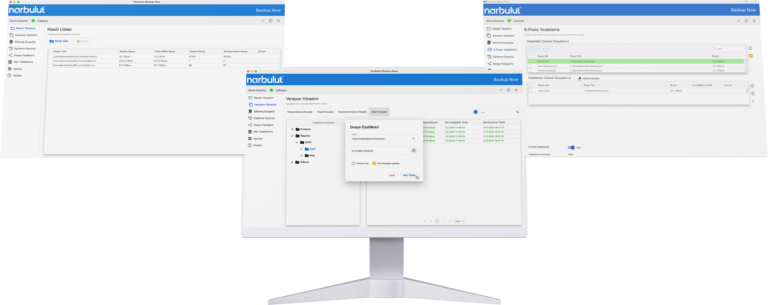
Backup Now
Automatically back up your files, databases, and emails to the cloud. Instantly restore your data in case of a ransomware attack.
Yes, if backups were taken beforehand. Thanks to Narbulut's unlimited versioning feature, you can revert to any version prior to the ransomware encryption. Your backups are securely stored in the cloud and remain unaffected by the attack.
Absolutely. While antivirus software tries to prevent threats, backup recovers your data after an attack. These two solutions complement each other. Antivirus protects, backup recovers.
Restore time depends on data size and connection speed. However, with Narbulut, you can instantly access your clean backup. Small files are restored in minutes, while large databases are restored within a few hours.
Yes. The Narbulut Backup Now agent detects suspicious file activity and sends alerts via SMS and email. Additionally, unlimited versioning and isolated cloud storage ensure your data is always safe.
No. Narbulut's backup agent is optimized to use minimum CPU and RAM. It runs silently in the background and does not affect your daily tasks.
Yes. Thanks to Narbulut's 60-day recycle bin retention feature, you can recover all your files, including accidentally deleted databases.
You can easily restore through the Backup Now application or the Web Panel. Additionally, you can use our free SQL Restore Now tool for SQL databases.
Your data is stored in high-security data centers in Turkey. All data is protected with end-to-end encryption in a 100% PDPL-compliant infrastructure.
Narbulut Product Analysis
Step 1/12
What area of technological improvement are you planning for your company?
Data Security & BackupRansomware, deleted files and disaster recovery.
Cloud Server (IaaS)Website, ERP, CRM or application hosting.
Team CollaborationSecure file sharing and remote work.
Object Storage (S3)Object Storage for developers.
What industry does your company operate in?
Healthcare / MedicalPatient data (GDPR critical).
Finance / AccountingSensitive financial data.
Manufacturing / EngineeringCAD drawings and production plans.
Other / General ServicesOffice documents and general data.
What type of devices need to be protected?
Employee ComputersLaptop and desktop end-user devices.
Physical / Virtual ServersDatabase, Active Directory or File Server.
What should your backup strategy be?
File & Folder BasedOnly important business files (XLS, PDF, SQL) should be backed up.
Full Disk ImageBack up "Everything" including the operating system.
What is your upload speed for cloud backup?
Fiber / High SpeedI can send large data quickly.
Standard / ADSLMy speed is limited, compression is important.
Is ransomware a threat?
Yes, Very CriticalWe have experienced it before or are at risk.
Standard Protection is SufficientBasic backup measures are enough.
How long would you like to keep versions?
30 - 90 DaysTo fix recent errors.
1 Year and AboveLegal requirements or archiving.
What will be the primary purpose of the server?
E-Commerce / WebsiteHigh uptime and speed required.
ERP / Accounting SoftwareDatabase performance is important.
Software DevelopmentFlexible resource management.
What infrastructure do you need?
Windows ServerASP.NET, MSSQL, RDP.
Linux (Ubuntu/CentOS)PHP, Python, MySQL, Docker.
What is the estimated user traffic?
Low / MediumEntry level or new project.
High TrafficHeavy campaigns or many users.
Who will manage the server?
I Will Manage ItI have a technical team, root access is enough.
I Need SupportManaged Services required.
How many people will work in the shared workspace?