
- Company
-
Products
Products
New ProductCloud Server
Fully managed virtual server infrastructure. Setup in minutes, hourly billing and expert support so you can focus on your business.
Try Now -
Solutions
Backup & Security
Data SecurityRansomware & encryptionSilent Ransom: TDEProtection against TDE abuseCloud BackupSecure backup to data centersImage BackupFull disk image + fast recoveryOff-Site BackupOff-site disaster recoveryMobile BackupiOS & Android photos/contactsRansomware ProtectionAgainst ransomware attacksTwo-Factor Auth2FA account security - Plans
- Resources
- Partners
- Blog
Full vs Incremental vs Differential Backup
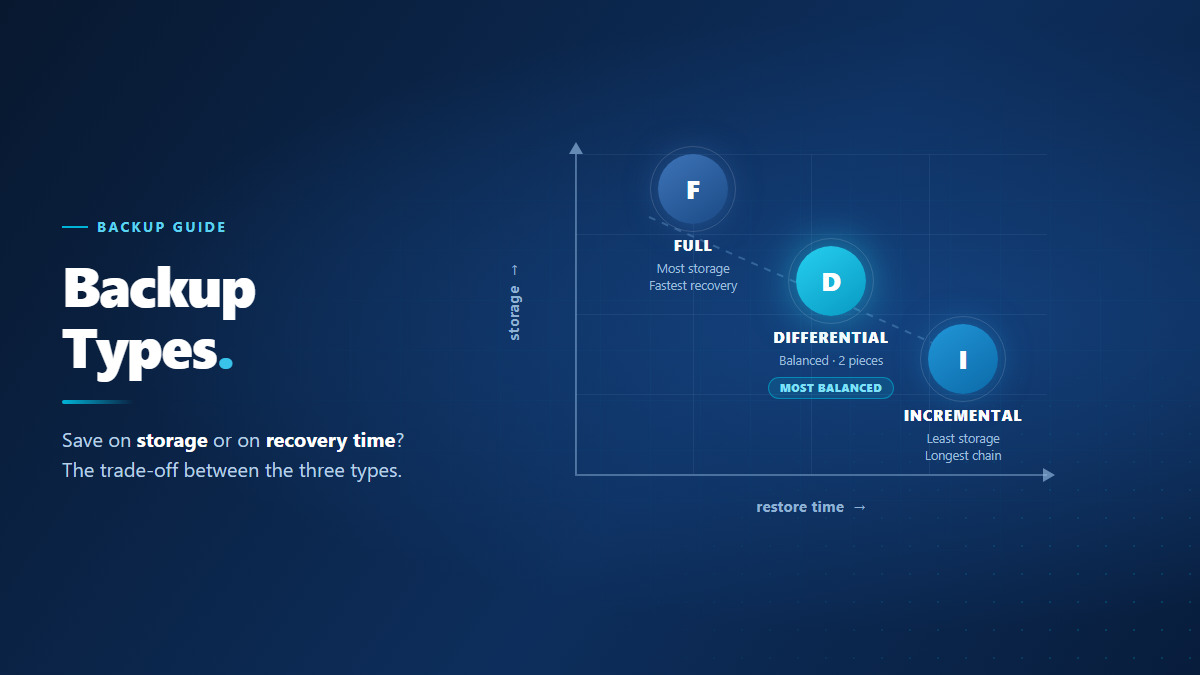
You install your backup software, it offers you “Full”, “Incremental” and “Differential” — and nowhere does it say which one you are supposed to pick. All three end up protecting the same data. The difference shows up in how long the backup takes, how much space it consumes and, most importantly, how long it takes you to get back on your feet when something goes wrong.
Because those three variables pull against each other, there is no single “best” type — only a balance that depends on your own data. Below we go through how each type works, where exactly the difference comes from, and which one makes more sense in which scenario.
What does the backup type actually decide?
Choosing a type looks like a technical detail, but it directly determines three practical outcomes. They have to be considered together, because improving one usually costs you another.
- Backup duration: The job has a window it needs to finish in overnight. If the backup spills into working hours it slows your systems down; if it never finishes, there is no backup for that day.
- Storage footprint: The more data you keep, the higher the cost. More importantly, a method that takes up less space lets you keep more days of history on the same budget.
- Restore time: On the day something breaks, this is the only number that matters. What determines your losses is not how fast the backup was taken, but how quickly you can get back to your data.
What separates the three types is which data they copy on each run. That single decision drags all three outcomes along with it. For the wider picture of backup and where the cloud side fits into it, see our cloud backup guide.
Full backup: everything, every time
A full backup copies all of the data you selected, from scratch, on every run. Changed yesterday, changed last year or never changed at all — it all gets written again.
Its advantage is its simplicity: every full backup is complete on its own. To restore, you need no other file — you open a single backup and you are done. That makes it the fastest type to recover from and the one with the fewest things that can go wrong.
The price is time and space. On a system taking a full backup every day, even if 1% of your data changed, 100% of it is transferred again. On a file server of a few hundred gigabytes that fills up the nightly window and builds a serious storage bill within weeks.
Whichever type you choose, the first backup is always a full backup. Incremental and differential cannot run without a baseline to build on. So “I switched to incremental but the first night took forever” is not a fault — it is the expected behaviour.
Incremental backup: whatever changed since the last backup
An incremental backup copies only the data that changed since the last backup. The critical detail is this: the point it refers back to is the most recent backup, regardless of its type.
If you took a full backup on Monday, Tuesday’s incremental picks up what changed since Monday. Wednesday’s incremental, however, looks at Tuesday — not Monday. So each run carries only a single day’s worth of change.
The result is the smallest files and the shortest backup times of the three. On a remote branch working over limited bandwidth, or on a server with a tight nightly window, this is often the only workable option.
You pay for it when you restore. To get back to Thursday’s state, Monday’s full backup must be applied first, then Tuesday’s, Wednesday’s and Thursday’s incrementals in order. This is a chain, and chains have one defining property: if a single link in the middle is corrupted or accidentally deleted, every backup after that link becomes unusable.
Differential backup: everything since the last full backup
A differential backup fixes its reference point: on every run it copies everything that changed since the last full backup.
If you took a full backup on Monday, Tuesday’s differential picks up what changed since Monday. Wednesday’s differential also looks back at Monday — meaning it includes Tuesday’s changes as well. Because each run contains the previous one, differential backups grow as they get further from the full backup. By the end of the week their size can approach that of the full backup itself.
What you gain shows up at restore time: you only need the full backup plus the most recent differential. You never touch the days in between. Being a two-piece operation, it is both faster and free of the risk of a broken chain.
That is why differential is considered the middle ground: it takes less space than a full backup and restores faster than an incremental one.
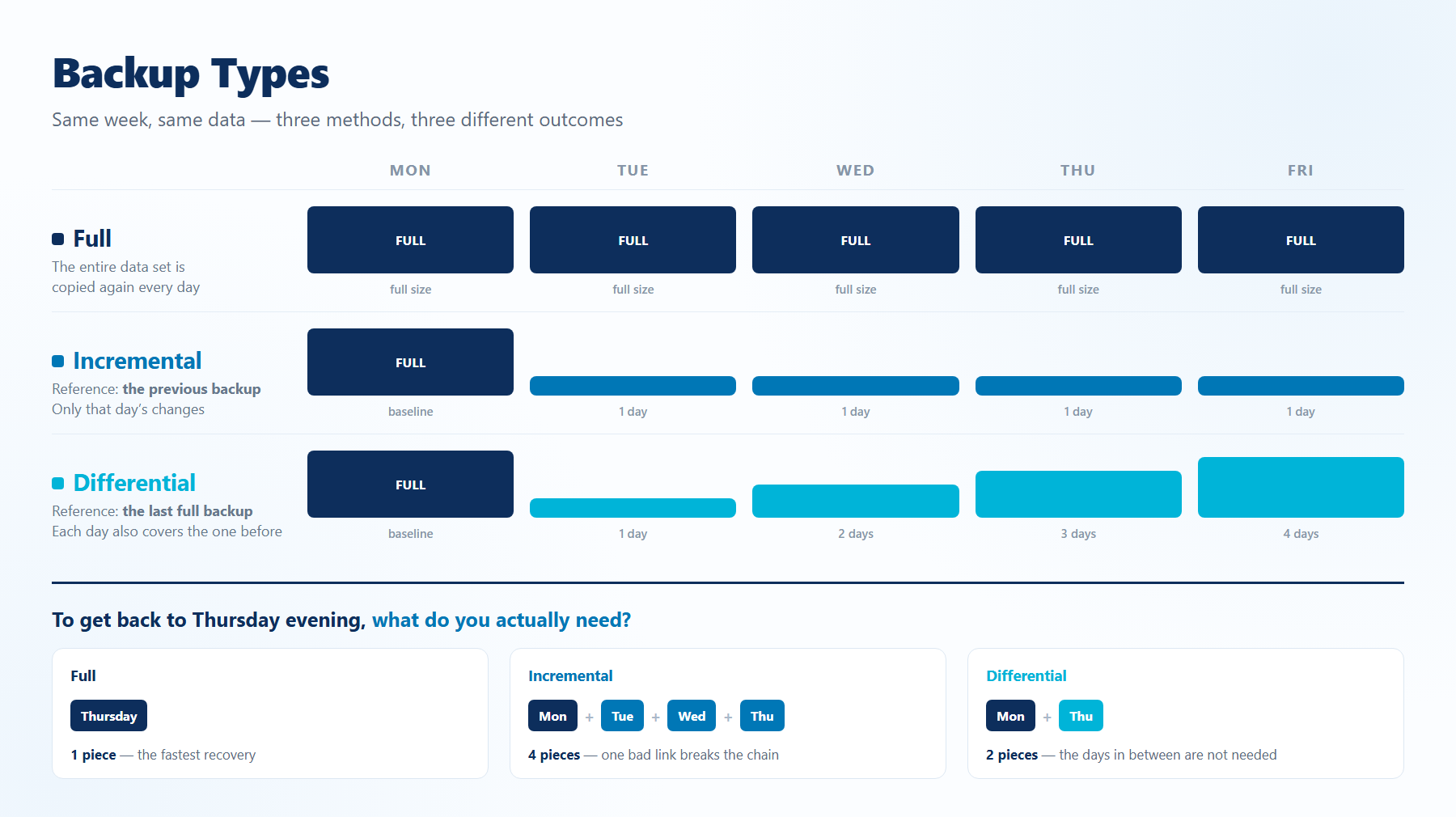
Side by side: duration, storage and restore balance
Put the same scenario next to each other for all three types and the picture becomes clear:
| Full | Incremental | Differential | |
|---|---|---|---|
| What it copies | All of the data | Changes since the last backup | Changes since the last full backup |
| Reference point | None | The previous backup (any type) | Always the last full backup |
| Backup duration | Longest | Shortest | In between, grows over time |
| Storage used | Most | Least | In between, grows each day |
| Needed to restore | A single backup | Full backup + every incremental in the chain | Full backup + the latest differential only |
| Restore time | Shortest | Longest | Short |
| Risk of a broken chain | None | High | Low |
The symmetry is striking: on every row where incremental is best, restore is at its worst — and with full backup it is exactly the other way round. Differential sits between the two and is, in practice, the most balanced option for most companies.
One more thing worth adding: choosing a type is not a substitute for a backup strategy. Whichever type you use, how many copies you hold and where they sit is a separate question — we covered that side in our article on the 3-2-1 backup rule.
Which type should you choose, and when?
In practice these types are not used alone but together. The common setup is a full backup once a week, with incrementals or differentials on the days in between. To decide, look at these scenarios:
- Your data is small and your nightly window is wide — if you are working with a few tens of gigabytes, taking a full backup every day is still perfectly possible. It is the simplest arrangement, and there is no need to add complexity.
- Your backup window is tight or bandwidth is limited — weekly full plus daily incremental. Remote branches, mobile teams and large file servers usually land here.
- Speed of recovery is critical — weekly full plus daily differential. On systems where downtime costs money directly, the extra space a differential takes is more than worth the time it saves you during a restore.
- You are backing up a database — copying a database file flat while it is running does not produce a consistent backup. The database’s own consistent backup mechanism should be used, and the type decided from among the options it offers.
- You want to protect a whole server — coming back in one piece, complete with the operating system, installed software and settings, is not a job for a file backup. That layer calls for an image backup solution such as Easy Image Backup.
Once the decision is made, what remains is tying it to a schedule that runs reliably. Narbulut Backup Now moves your file, e-mail and database backups to the cloud side through scheduled jobs; once you have set the frequency and the retention period, the routine keeps running without manual intervention.
The most common mistakes when choosing a type
The same handful of mistakes keeps coming back, and they all share one trait — the problem surfaces not while backing up, but while restoring:
- Never breaking the chain. Running incrementals for months without taking a new full backup produces a chain that takes hours to restore and is defenceless against a single corrupted file. The full backup has to be repeated at regular intervals.
- Assuming retention is independent of type. In an incremental setup, deleting the full backup at the head of the chain makes every incremental after it meaningless on its own. Your retention rule has to treat the chain as a single unit.
- Not accounting for the cost of switching types. When you change the type, the next run will be a full backup. Schedule that inside a narrow nightly window and the backup will spill into working hours.
- Never having measured your restore time. Most companies know how long their backup takes and have no idea how long a recovery takes. Yet that second number is the real reason behind the choice of type.
- Trusting the “successful” notification. A green backup report does not mean that backup can be opened. Without regular restore testing, no type will protect you — you can find this and similar habits collected in our article on the 7 golden rules of backup.
In short: full backup gives you the safest recovery, incremental the most efficient backup, and differential the balance between the two. The way to find your answer is to ask yourself a single question — if this data were lost, how quickly would I need to be back? The type that fits inside that window is your type.
Narbulut Backup Now
Move your file, e-mail and database backups to the cloud with scheduled jobs; set the frequency and retention period once and let the routine run on its own.

